
Integrate EPLAN with your ERP
Get electrical and controls BOMs from EPLAN into your ERP 5x faster.
Intelligent automation that turns your EPLAN project data into the items, BOMs, and routings your ERP builds from, alongside the mechanical design.
Integrate Your CAD
System With SYSPRO
Go from engineering to manufacturing 5x faster!
EPLAN integration
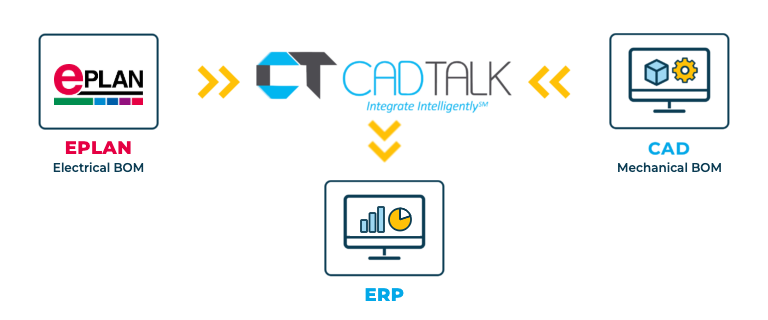
CADTALK ERP is an off-the-shelf integration between EPLAN and your ERP. It reads your EPLAN project data through EPLAN's Integration Suite and transforms it into manufacturing-ready items, BOMs, and routings.
Automation and machinery builders design the controls in EPLAN and the machine in a mechanical CAD system. CADTALK reads both in a single integration, so the electrical and mechanical BOMs land in the ERP as one product structure.
Key EPLAN integration features


Why getting EPLAN and your ERP talking pays off
Controls BOMs are long and precise. When they're keyed into the ERP separately from the mechanical BOM, purchasing works from two lists that don't quite agree.
One product record for the whole machine
Electrical and mechanical BOMs land together, so purchasing, planning, and production see the complete machine.
The right parts on the purchase order
Rules match manufacturer part numbers to ERP items, so purchasing orders what the schematic calls for.
How CADTALK works with Teamcenter
Step 1: Read
CADTALK reads the EPLAN project data through the Integration Suite, and combines it with the mechanical BOM when both are in scope.
Steps 2 to 4:
Frequently Asked Questions
Frequently Asked Questions
EPLAN's Integration Suite. CADTALK reads your project data through it.
Yes. EPLAN and your mechanical CAD feed the same ERP in one integration.
More questions about CADTALK in general? See the Integration Hub FAQ.
Still keying controls BOMs into your ERP?
Book 30 minutes with a CADTALK solutions engineer. Talk to an expert.
