Here's what you're really asking: Will we be stuck calling the vendor every time our business changes?
And honestly? It's the right question. Maybe the most important one you can ask when evaluating integration platforms.
Manufacturing doesn't sit still. New suppliers come online. Materials get substituted. You acquire a competitor and suddenly have three part numbering schemes to reconcile. Your ERP upgrades and field mappings shift. This is Tuesday in manufacturing.
If every one of those changes requires a $150-200/hour consultant's bill? Plus the two-week wait to get on someone's calendar? Your integration becomes a liability instead of an asset. The tool that was supposed to save time starts costing you agility.
So yeah. This question matters.
When Custom Development Actually Makes Sense
Let's be honest. Custom-built integrations aren't always the wrong choice. They work for certain scenarios. If they didn't, the companies that build custom solutions wouldn't have customers.
Here's when custom genuinely makes sense:
Your processes are rock-solid stable. If your CAD-to-ERP workflow hasn't meaningfully changed in five years and you don't see that changing anytime soon, custom can work. Stability is the key word. Some manufacturers really do operate this way.
You have a committed in-house development team. Not a single contractor. A team with real documentation practices and organizational commitment to maintain what they build. If your developers understand both CAD and ERP systems deeply and they're not going anywhere, you have options.
Your requirements are truly unique. Some manufacturers have genuinely unusual workflows that no platform handles out of the box. Regulated industries, defense contractors, highly specialized production processes. Sometimes custom is the only path.
You prefer owning your own code. Some organizations philosophically want to control their own destiny through code ownership. If you have the resources to maintain it long-term, that's a legitimate choice.
Sound like your situation? Custom might actually be the right call.
However, we've found that, most manufacturers don't stay in that stable state forever.
Where Custom Gets Complicated
It's not that custom integrations don't work. They often work great! ...for a while.
The challenge is what happens when things change. And things always change.
Here's the thing nobody tells you upfront. With a custom integration, you're maintaining two completely different things:
1. Your business logic. The transformation rules. Make-vs-buy decisions. Part numbering schemes. How engineering BOMs become manufacturing BOMs. This is the stuff that should change as your business evolves. New supplier? Update the rules. Acquisition? Incorporate their part numbering. New product line? Adjust the BOM structure.
2. The technical plumbing. API connections to your CAD system. API connections to your ERP. Data structure mappings. Authentication. Error handling. Version compatibility. This is the stuff that should just work. Quietly. In the background. Without requiring your attention.
With custom development, both of these land on the same desk. Usually the developer who built it. And that's where things get complicated.
- The developer leaves. Tribal knowledge walks out the door. Now you're hunting for someone who understands both your business rules AND the technical plumbing.
- Your systems upgrade. Your ERP updates its API. Your custom integration breaks. Your business rules didn't change. The connection broke anyway.
- Your business evolves. New product line, new BOM structure, acquisition with different CAD platform. But you can't update business logic without navigating the custom code wrapped around it.
- You're hostage to availability. Urgent business rule changes wait in the same queue as technical maintenance. Simple field additions take weeks because the person who understands the plumbing is busy.
The pattern is predictable. Custom integrations work well for about 18-24 months. Then something changes. Personnel, systems, business requirements. And suddenly you're paying premium rates to maintain two things that really shouldn't be bundled together.
So what's the alternative?
The Platform Deal: You Handle Process, We Handle Connection
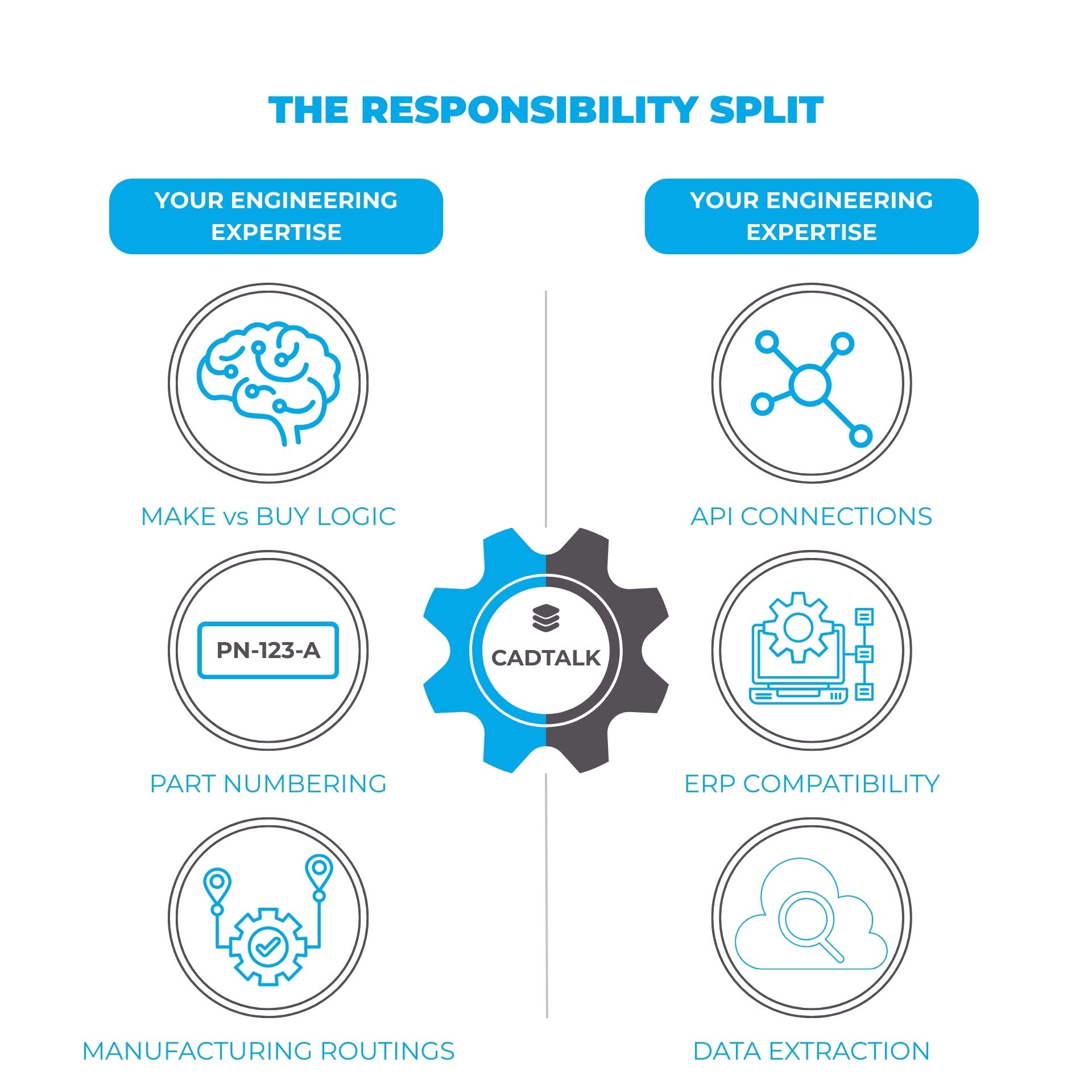
Here's the deal with a configurable platform. We split that burden.
We train you to maintain what's yours. Your business logic. Your transformation rules. Your process decisions. The stuff that should evolve as your business evolves.
Meanwhile, we maintain what you shouldn't have to think about. The API connections. System compatibility. Upgrade resilience. The stuff that should just work.
When IFS releases a new version, we've already tested against it. When SolidWorks updates their API, we handle the compatibility. You focus on how your BOMs should transform. We make sure the data actually gets there.
How It Works
Think Microsoft Excel. Most people start with basic formulas (e.g., =SUM(A1:A10)). With practice, they build complex models using nested functions, conditional logic, and cross-sheet references. The person who creates sophisticated financial models in Excel didn't go to programming school. They learned progressively. Built capability through use.
Integration rules engines work the same way. The platform provides the framework. You define the logic. And during implementation, we make sure you walk away equipped. Not dependent on us for every field mapping. Not waiting on our calendar for simple changes. Ready to handle your own rules from day one, with room to grow.
Here's what that progression looks like in practice:
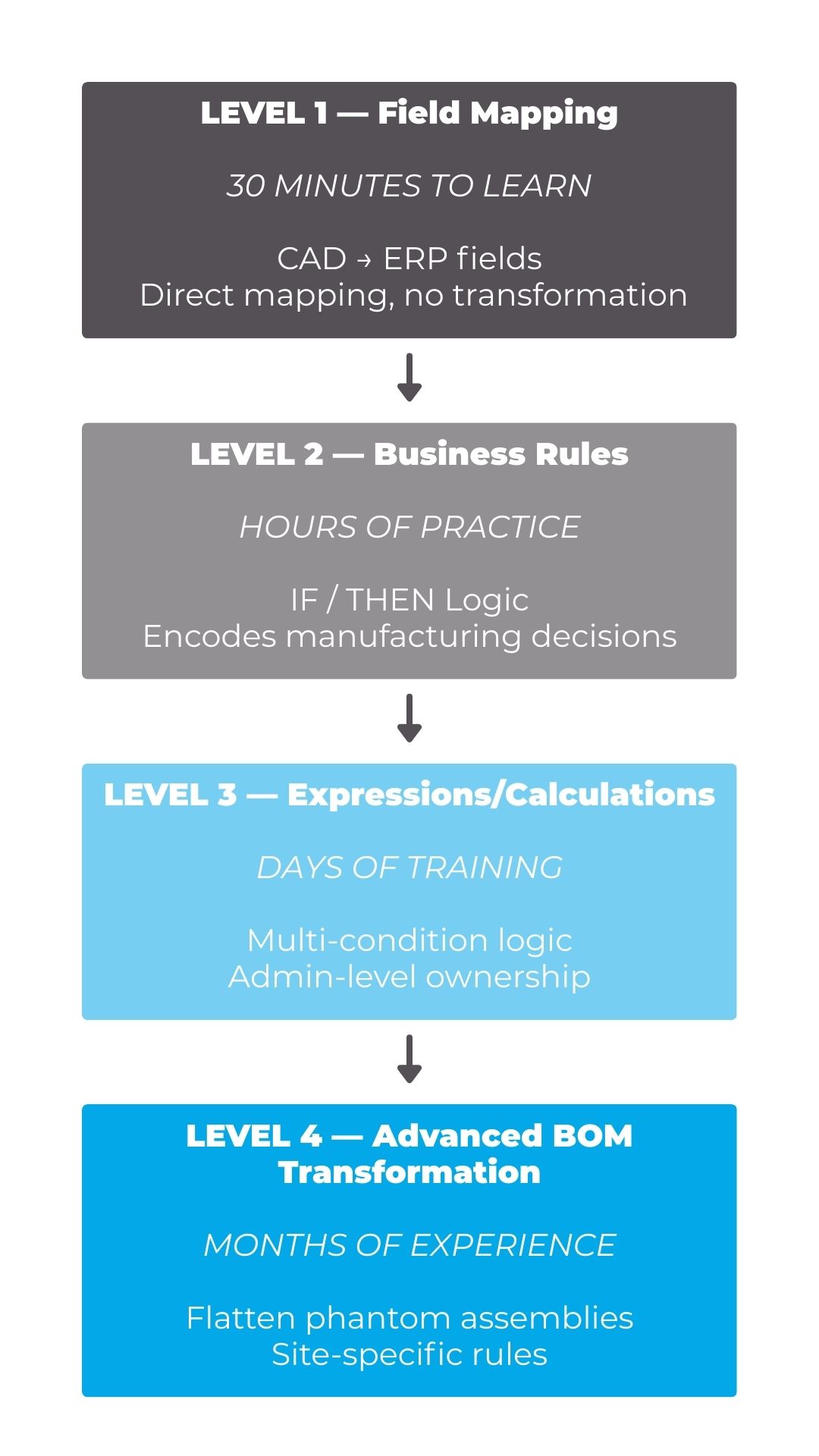
Level 1: Basic Field Mapping — 30 Minutes to Learn
At the simplest level, you're connecting properties from CAD to fields in your ERP. Direct mapping. CAD property "Material" goes to ERP field "Material_Type." No transformation, just connection.
Even at this level, you're doing useful work. Maybe engineering started using a new custom property in SolidWorks and you need it visible in IFS or Business Central. With a configurable platform, you add the mapping yourself. Five minutes of work. No vendor call required.
Anyone who completes initial training can handle Level 1. It's intentionally simple. The platform wants you to succeed early.
Level 2: Conditional Logic — A Few Hours of Practice
Now you're applying business rules. IF this condition exists, THEN do this action. This is where the integration starts encoding your manufacturing knowledge.
The expressions read like English:
- IF Material = "Steel" THEN Make_Buy = "Make"
- IF Part_Number starts with "P-" THEN Item_Type = "Purchased"
- IF Weight > 50 THEN Handling_Code = "Heavy"
Level 2 doesn't require programming background. It requires understanding your own business logic. Why do certain parts get flagged as purchased? What determines whether something routes through your machine shop or goes to a supplier?
If you can explain the rule, you can configure the rule.
Most manufacturing engineers pick this up quickly. They already know the decision logic. They've just never had a tool that let them express it directly.
Level 3: Complex Expressions — 2-3 Days of Training
Here's where things get interesting. You're combining multiple conditions, performing calculations, and building expressions that handle real-world complexity.
Examples of Level 3 work:
- Calculate estimated cost based on material density, volume, and current commodity prices
- Generate standardized descriptions by concatenating multiple CAD properties with formatting
- Apply multi-condition logic: IF (Material = "Aluminum" AND Thickness > 0.125) AND (Finish = "Anodized") THEN Route_To = "Outside_Processing"
This level typically requires a designated administrator. Someone who invests time learning the expression syntax and testing configurations. Not everyone on your team needs Level 3 capability. One or two people who handle integration maintenance is usually enough.
The key difference from custom development? You're still configuring, not coding. The platform provides expression builders, validation tools, and sandbox environments. You can test before deploying. You can see exactly what the transformation will do before it touches production data.
Level 4: Advanced BOM Transformations — 6-12 Months of Practice
Level 4 is graduate-level work. The scenarios that make integration consultants reach for coffee:
- Phantom assembly flattening. Engineering organizes BOMs logically with sub-assemblies that manufacturing doesn't build as discrete units. Level 4 rules automatically flatten these phantoms, rolling components up to the appropriate parent.
- Configuration-specific transformations. SolidWorks configurations or Inventor iParts create multiple variants from single files. Level 4 rules generate separate ERP items for each configuration with variant-specific attributes.
- Multi-site supplier logic. Same part, different suppliers depending on manufacturing location. Ohio plant uses Vendor A. Mexico plant uses Vendor B. Level 4 rules apply site-specific mappings automatically.
Few people reach full Level 4 proficiency. And that's fine. These scenarios don't come up daily. But when they do, having someone on staff who can configure the solution changes your response time from weeks to hours.
What Independence Actually Looks Like
Here's the typical pattern. Customers start vendor-dependent and become progressively self-sufficient.
During implementation, the integration partner handles everything. They configure initial rules, build expressions for your specific transformations, and get you running. At this stage, you're learning. Watching how rules get built. Asking questions. Understanding the logic.
By month three, your designated administrator is handling Level 1 and Level 2 changes independently. New field mapping? Done internally. Simple conditional logic? Handled. You're calling for help on complex scenarios, but routine maintenance happens in-house.
By month six, that same administrator is tackling Level 3 work with occasional guidance. They've built confidence through practice. They know where to find documentation. They've learned the debugging patterns. The vendor becomes a resource for unusual problems rather than a requirement for every change.
By year two, many organizations handle 80-90% of rule modifications internally. They call for help when adding entirely new integration points. Connecting a new CAD system. Targeting additional ERP modules. Strategic projects still benefit from expert guidance. But operational changes? Those happen at the speed of your own team.
Oh, and the whole time? We're still maintaining the API connections. Your ERP upgraded twice during that two-year journey. Your CAD platform pushed three updates. You didn't notice because the plumbing just worked.
That's the goal. Not permanent dependency, but progressive empowerment.
What Makes Self-Sufficiency Possible
Here's what to look for:
- Visual expression builders. You shouldn't need to hand-code transformations. Point-and-click interfaces. Syntax assistance. Auto-complete for available fields and functions.
- Sandbox environments. Testing against production data is terrifying. You need isolated environments where you can run configurations against sample data, see results, and validate before deployment. If you break something in sandbox, you learn. If you break something in production, you have a very bad day.
- Pre-built templates. Common scenarios shouldn't require starting from scratch. Make-vs-buy logic, phantom flattening, part number transformations. These patterns exist across manufacturing. Good platforms give you starting points to adapt.
- Documentation with real examples. Generic API docs help no one. You need documentation that shows actual manufacturing scenarios. "Here's how to handle purchased components with multiple approved vendors." Real problems, real solutions.
- Progressive training paths. Implementation training is just the start. Advanced workshops as your team matures. Platform update sessions. Active user communities where you learn from peers who've solved similar problems.
We've been doing this since 2006. Hundreds of implementations across six continents. The pattern is consistent: customers who invest in learning the rules engine gain independence. Those who treat it as a black box stay dependent.
The Freedom to Evolve
Manufacturing changes. That's not a bug. It's the nature of the business.
You'll switch suppliers when costs shift or quality issues emerge. You'll acquire companies and inherit their processes. You'll launch product lines that don't fit your existing BOM structures. You'll upgrade ERP systems to stay current and supported.
Every one of these changes touches your integration. The question isn't whether you'll need to modify rules. The question is whether you'll be able to do it on your timeline. With your resources. At your pace.
Configurable platforms provide that freedom. When your business changes on Monday, you can respond on Tuesday. Not three weeks from now when the consultant has availability.
Custom integrations anchor you to the person who built them. Configurable platforms anchor you to your own team's growing expertise.
Over five years of business evolution? That's not a small difference.
Questions I'd Ask If I Were in Your Shoes
Evaluating integration platforms? Here's what I'd want to know:
- "What percentage of your customers handle routine rule changes internally after year one?" Vague answers suggest the platform isn't actually designed for self-service.
- "Can I see the expression builder interface?" If it looks like a code editor, you'll need developers. If it looks like a configuration tool, you're on the right track.
- "What does your training path look like beyond initial implementation?" One-time training at go-live and nothing after? They expect you to call them for everything.
- "What happens when I break something in testing?" The answer should involve sandbox environments and easy rollback. Not panic.
- "Show me documentation for a specific manufacturing scenario." Generic API docs aren't enough. You want to see how real transformations get configured.
- "What does ongoing support cost, and what's included?" If every rule change requires billable professional services, you're not buying a configurable platform. You're buying disguised custom development.
The Bottom Line
The question "Can we modify rules ourselves?" is really asking: Will this integration grow with us or hold us back?
Custom development works for some organizations. If your processes are stable, your dev team is committed, and you have resources for long-term maintenance, it's a legitimate path.
But most manufacturers need something different. They need the freedom to adapt without waiting for someone else's availability. They need cost efficiency over the long haul. They need independence for the 80% of changes that are straightforward, with expert support for the 20% that genuinely require it.
That's what configurable platforms provide. Not just technology, but a path toward owning your own integration destiny.
Your business will change. The question is whether your integration will change with it. On your terms.
Ready to See Configuration in Action?
Understanding the concept is one thing. Seeing it work with your actual data is another.
Curious what this looks like with your own data? Bring your CAD files. We'll show you exactly how rules engine configuration works for your specific BOM structures and transformation requirements. Schedule a Demo
Want to see what manual BOM entry is actually costing you? Quantify what you're currently spending on data entry and integration maintenance. The math usually surprises people. Calculate Your ROI
For ERP Partners: Integration expertise differentiates you from resellers who just implement and walk away. Contact our Partnership Team to explore enablement resources and certification paths.
SCHEDULE A CADTALK DEMO
Ready to see what CADTALK can do for your business? See it in action!