

If you're a manufacturer, you've probably watched engineers manually re-enter BOM data from SolidWorks into your ERP system and wondered if there's a better way. If you're an ERP partner, you've seen this pain point across dozens of clients and need to speak intelligently about solutions. Either way, this guide is for you.
Over the past year, CADTALK has analyzed hundreds of discovery calls, demos, and partner conversations. The same questions keep coming up: from "How does this actually work?" to "What happens when our ERP upgrades?" This guide walks through all 20, organized from foundational concepts to advanced scenarios.
For manufacturers: You'll find ROI frameworks, implementation timelines, and the technical details you need to evaluate solutions and build internal business cases.
For ERP partners: Each section includes partner-specific guidance on positioning, client conversations, and where you can add strategic value beyond the technology.
What's Inside
- The Basics (Q1-5) — How it works, cost, timeline, system compatibility, custom requirements
- Implementation & Change Management (Q6-7) — Engineer adoption, revision control
- Technical Deep Dives (Q8-12) — Automation levels, complexity handling, data accuracy, support, self-service
- Business Questions (Q13-18) — Existing processes, documents, licensing, experience, POCs, upgrades
- Long-Term Considerations (Q19-20) — Multi-site deployment, success metrics
THE BASICS: UNDERSTANDING INTEGRATION
1. How does CAD-to-ERP integration actually work?
Think of it as an intelligent translator sitting between your design and manufacturing worlds.
When an engineer completes a design in CAD (like SolidWorks, Inventor, or Creo), that file contains all the technical data—parts, assemblies, quantities, materials, custom properties. Integration software reads this data, transforms it according to rules you define, and writes it directly into your ERP system as a manufacturing-ready BOM.
The key word is "transforms." It's not just copy-paste. An engineering BOM and a manufacturing BOM are different animals. Engineering might show every screw and washer. Manufacturing needs to know about kits, phantoms, make-vs-buy decisions, and supplier part numbers.
Different solutions take different approaches. Some use custom development, building a unique integration just for your systems, which means every change requires developer time. Others use configurable rules engines where you define the transformation logic once, then adjust it as your processes evolve. With platforms like CADTALK, the rules-based approach gives you more control long-term without vendor dependency for every change.
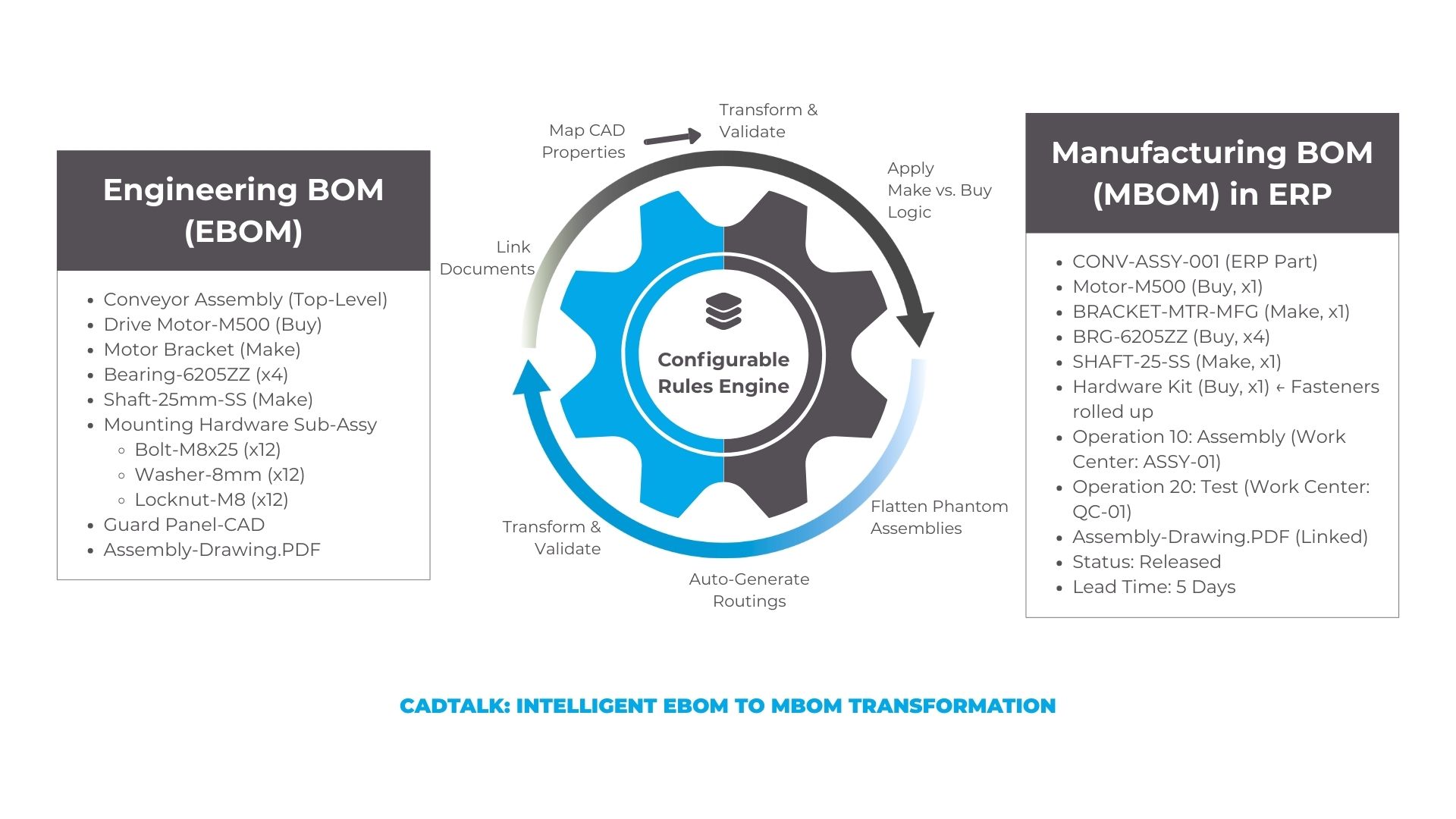
Most modern integrations connect via APIs that already exist in your CAD and ERP systems. No custom coding into your source systems. No data stored in between. Just intelligent transformation from point A to point B.
2. What does CAD-ERP integration cost?
With CADTALK, you can expect to pay between $20,000 to $50,000 for year one (small to mid-size implementations), with $10,000-$25,000 annually thereafter. Larger, multi-site global manufacturers can see six-figure implementations, but that's the exception.
What drives cost:
- Number of integration points (one CAD system vs. multiple)
- Complexity of transformations needed
- Licensing model (floating licenses typically offer better value)
- Implementation services
The ROI calculation: If you have 10 engineers spending 6 hours per week on manual BOM entry, that's 3,120 hours annually. At $75/hour loaded cost, you're looking at $234,000 in non-value-added work. Every year. ROI in 2 to four months.

For partners: Help clients quantify the hidden cost. Most manufacturers haven't done the math until you show them.
Want to run the numbers for your specific situation? Use CADTALK's ROI Calculator →
3. How long does implementation take?
Expect 8-12 weeks from contract signing to production go-live for a typical single-site implementation.
The basic timeline:
- Weeks 1-2: Discovery and requirements
- Weeks 3-4: Configuration and rules setup
- Weeks 5-7: Testing with real data
- Weeks 8-10: Training and change management
- Weeks 11-12: Parallel production, then go-live
Multi-site deployments, complex transformations, or holiday schedules can extend this. The key accelerators are clear requirements upfront, dedicated resources, and executive sponsorship.
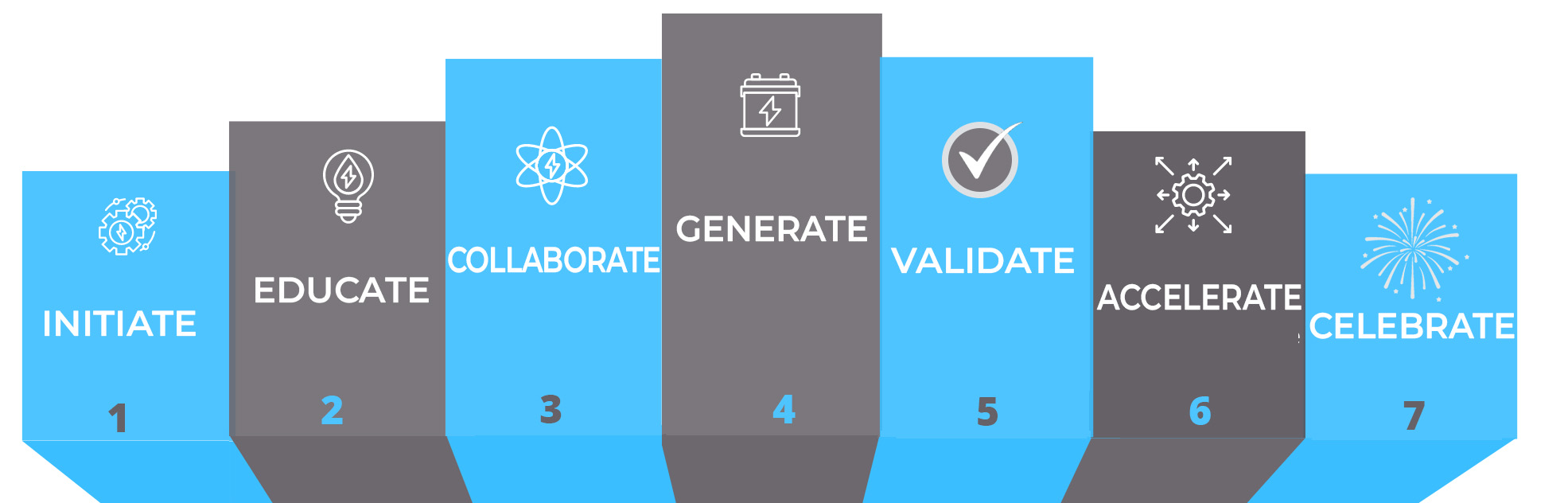
CADTALK's 7-step implementation process
For partners: Help clients maintain momentum. Twelve weeks to eliminate years of manual work is fast (if they stay focused).
4. Which CAD, PDM, PLM, and ERP systems are supported?
This is often the first qualifier question. If a solution doesn't connect to your tech stack, nothing else matters.
Common integrations include CAD systems like SolidWorks, Inventor, Creo, and NX; PDM/PLM platforms like SolidWorks PDM, Vault, Windchill, and Arena; and ERP systems like Microsoft Dynamics 365 Business Central, IFS Cloud, Infor, NetSuite, and Acumatica.
Not every integration vendor supports every combination. Some specialize in specific platforms. Ask vendors:
- How many active customers on your exact CAD/ERP combination?
- Can you demo with our specific systems?
- How do you handle version upgrades?
For partners: If you're an ERP reseller, partner with integration vendors who have deep experience in YOUR platform specifically.
5. Can your solution handle CADTALK's specific requirements?
Every manufacturer thinks they're unique. And you know what? You probably are, at least partially.
Common requirements that seem unique but aren't:
- Custom part numbering schemes
- Phantom BOMs (exist in CAD but not ERP)
- Make-vs-buy logic
- Multi-site manufacturing
- Revision control workflows
- Document attachments
- Configuration-specific BOMs
The configurable vs. custom question: Some vendors build anything you need with custom development. Sounds flexible until you're locked into their development team for every future change. Configurable platforms like CADTALK use a rules engine (smart configuration engine); steeper learning curve initially, but you eventually gain independence.
Pro tip: Don't gold-plate requirements. Start with the 80% that delivers 80% of value. Get it working. Then tackle edge cases.
IMPLEMENTATION & CHANGE MANAGEMENT
6. How do we get engineers to actually use this?
You can have perfect technology that sits unused because engineers prefer their Excel spreadsheets. This is often the biggest implementation challenge.
Why engineers resist:
- Learning curve: "I can enter a BOM in 20 minutes, why learn a new tool?"
- Loss of control: "What if the automation gets something wrong?"
- Change fatigue: "We just went through an ERP implementation."
- Skepticism: "This benefits management, not me."
What actually works:
Involve engineers early. Don't surprise them with "We bought a tool!" Include senior engineers in vendor demos. Let them ask hard questions. When they feel heard, they become advocates.
Start with advocates. Train your 2-3 most tech-savvy, improvement-minded engineers first. Let them be heroes when they complete BOMs in 5 minutes instead of 2 hours. Peer influence is more powerful than management mandates.
Show what they GET, not just what changes:
- No more ERP training on BOM entry
- No more "I forgot to add a washer" weeks after launch
- No more manufacturing asking "Why doesn't this match?"
- No more rev mismatch headaches between systems
- More time for actual engineering work
Run parallel for 2 to 4 weeks. Let engineers create BOMs both ways. They'll see the quality difference and time savings themselves. Self-conviction beats top-down mandates.
Executive air cover. VP of Engineering needs to say "This is the new process" with clear "why" communication: "We're growing fast. Manual processes won't scale. I need you focused on design, not data entry."
Typical adoption pattern: Engineers often resist for 2-3 weeks during the learning curve. Then comes the breakthrough moment: updating a 500-part assembly after a supplier change in 15 minutes versus the full day it would have taken manually. That first win creates advocates. Sometimes it just takes one engineer seeing dramatic time savings to shift the entire team's mindset.
For partners: This is where you earn your value beyond technical implementation. Help create the change management plan. Offer to attend engineer training sessions. Be the lightning rod for concerns so your client doesn't have to be.
7. How does revision control work between CAD and ERP?
The core problem: CAD revisions and ERP revisions don't always mean the same thing. A minor geometry tweak in CAD might not matter to manufacturing, while a material change definitely does.
Three common approaches:
Mirror revisions: Every CAD revision bump creates a new ERP revision. Simple to understand but can create noise during design iterations.
Selective propagation: Only "Released" revisions in PDM sync to ERP. Work-in-progress stays in engineering. Cleaner but requires PDM discipline.
Change order driven: Engineers initiate formal ECOs that trigger ERP updates. More control, more manual process, better for regulated industries.
Good integration solutions can automate Engineering Change Orders. Engineer marks changes in CAD, integration creates ECO in ERP with affected parts list, routing and approval happens per your process, then BOM updates and new revision is created.
Rollback and history: Your ERP maintains revision history. Integration doesn't erase anything; it creates new revisions with effectivity dates. You can always see what changed and when, which is critical for traceability.
For partners: Ask clients about their current ECO process before designing integration. Companies have wildly different change management maturity. Some have formal PLM workflows. Others use email and Excel. Meet them where they are, then help them improve.
TECHNICAL DEEP DIVES
8. How much manual work is still required?
Zero manual work is always the goal. Reality is usually 95% automated with 5% requiring human validation, which is about right.
What gets fully automated:
- Part creation with all attributes mapped from CAD properties
- BOM structure with parent-child relationships intact
- Quantities calculated (including overrides for yield)
- Make-vs-buy flags based on rules you define
- Unit of measure conversions
- Document attachments (PDFs, STEP files)
- Revision updates between systems
- Where-used relationships
- Routing references (if configured)
What typically needs human touch:
Exception handling: When a part number already exists in ERP but with different data, someone needs to decide: update it, create new revision, or flag for review? Most implementations have humans make that call initially, then refine rules over time to automate more.
New vendor parts: If engineering specifies a purchased component that doesn't exist in your ERP supplier catalog, someone needs to set up the supplier item master before the BOM can finalize. This is ERP master data management, not an integration limitation.
Final costing review: Integration can populate standard costs from CAD-estimated weight and material, but someone usually reviews before release to production.
First-time setup of new part categories: When engineering designs a completely new product family, you might need to define new transformation rules once. After that, all similar parts follow the pattern automatically.
The 90-day improvement curve: Most implementations start at 80% automation, 20% manual cleanup. By 90 days, that's usually flipped to 95% automated, 5% validation. That remaining 5% never goes fully to zero because manufacturing is dynamic. Suppliers change, processes improve, edge cases emerge. But it's strategic decisions rather than mindless data entry.
Instead of "Re-enter this 200-part BOM line-by-line," manual work becomes:
- "Review this flagged component to confirm supplier"
- "Approve this ECO in ERP" (which you'd do anyway)
- "Adjust quantity based on production yield learnings"
For partners: Help clients understand that remaining work is BETTER work: engineering judgment rather than typing. That's the value proposition.
9. Can your solution handle complex assemblies?
Define "complex" because every engineer thinks their BOMs are uniquely complicated. (They usually aren't, but let's examine what actually IS complex.)
Complexity dimensions:
Depth: How many levels deep? 3 levels? 10? 20? Most integration solutions handle unlimited depth. The question is whether your ERP can represent it. Some systems flatten structures beyond 7-8 levels.
Width: How many unique parts? 50? 500? 5,000? This is more about performance than capability. Can the integration process a 5,000-part BOM in 30 seconds or 30 minutes?
Configurations: SolidWorks configurations create different BOM variations from one file. Same car frame with 3 motor options = 3 configurations = 3 manufacturing BOMs. Good integrations handle this by creating separate ERP items for each configuration or using ERP variant logic (like Business Central's item variants or IFS Cloud's configuration rules).
Phantom assemblies: Sub-assemblies that exist for engineering organization but manufacturing doesn't build as discrete units. Example: "Wheel Assembly" in CAD shows hub, rim, tire, valve stem. Manufacturing receives complete wheels from supplier. ERP should show purchased item, not sub-components. Integration rules flatten these phantoms appropriately.
Multi-level where-used: When you change a common component like a fastener used in 200 assemblies, can you see everywhere it's used? Can you execute mass updates across affected BOMs?
The key question: Not "Can it handle complexity?" but "Can it handle YOUR complexity?" Bring your worst-case BOM to demos. The one with weird parent-child relationships. The one with configurations. The one that makes new engineers cry. If the integration handles that smoothly, you're good.
10. How do you ensure data accuracy?
Because if garbage goes in, garbage comes out.
Built-in validation strategies:
- Pre-flight checks: Before data leaves CAD, validate required properties, part numbering conventions, reasonable values
- Color-coded preview: Show engineers what will happen (
 no changes,
  updates,
  new)
new) - Dry-run capability: Process entire BOM in test mode, review, then run for real
- Post-creation validation: Check for orphans, cost ranges, referential integrity
Smart implementations track what fails and why, building rules to catch common problems proactively. The integration gets smarter over time.
For partners: Data quality improvement is a hidden benefit. Implementations force clients to clean up messy CAD properties and establish data governance.
11. What kind of ongoing support do you provide?
Day 2 after go-live is when real life starts and the implementation consultant is gone. This is when you discover whether you bought software or a partnership.
What support means:
Technical support: Software bugs, version compatibility issues, performance problems, integration failures. Basic stuff that should just work.
Application support: "How do I configure this rule?" "Why did this BOM behave unexpectedly?" "Can we add this new field mapping?" "Help us handle this new edge case." The ongoing optimization that turns good implementations into great ones.
Different vendor models:
Most vendors offer all-inclusive annual maintenance (18-22% of license cost) covering updates, patches, technical support via tickets and phone, and some application consulting hours. Some offer tiered levels: basic email support up to premium with dedicated success managers.
With CADTALK, maintenance includes software updates, technical support, application consulting for rule modifications, and access to our customer success team. We track usage patterns and reach out proactively when we see opportunities for optimization.
Training approaches:
Initial implementation typically includes 2-3 days: end user training for engineers, admin training for IT on system maintenance, and smart configuration engine training on how to modify configurations. But that's just the start.
Ongoing training matters: new hire onboarding (you'll have turnover), advanced smart configuration engine workshops (as your team gets more sophisticated), "what's new" webinars after major releases, and an active customer community where users share solutions.
What to look for:
- Response time SLAs for critical issues
- Proactive customer success (not just reactive support)
- Version upgrade support and testing assistance
- Rules engine training that makes you self-sufficient over time
- Active customer community where you learn from peers
Red flags:
- Email-only support with no phone option
- One-time training at implementation, that's it
- Expensive hourly rates for any rules changes
- Dormant user forums with posts from 2019
For partners: Clarify WHO provides support. Clients will call you first regardless. Make sure you have escalation paths and that your team gets trained on the platform too.
12. Can we learn to modify rules ourselves?
This separates empowering platforms from dependency traps. Your manufacturing processes will evolve (new materials, suppliers, products, acquisitions). You need to adapt integration rules quarterly. If every change requires vendor professional services at $150-200/hour, that gets expensive and slow.
Think Microsoft Excel. Basic users do simple formulas. Power users do complex models. With smart configuration engines, it's similar, progressive complexity levels:
Level 1: Basic field mapping (30 minutes to learn)
- CAD property "Material" → ERP field "Material_Type"
- Literal values: Set all new parts to Status = "Engineering"
Anyone trained can do this quickly.
Level 2: Conditional logic (few hours to learn)
- IF Material = "Steel" THEN Make_Buy = "Make"
- IF Part_Number starts with "P-" THEN Item_Type = "Purchased"
Requires understanding your business logic more than technical skills.
Level 3: Complex expressions (2-3 day training)
- Calculate cost based on material density, volume, and commodity prices
- Generate descriptions from concatenated properties
- Multi-condition logic with AND/OR statements
This is where you need dedicated admin training and practice.
Level 4: Advanced BOM transformations (6-12 months practice)
- Flattening phantom assemblies
- Rolling up costs across subassemblies
- Configuration-specific rules for variants
- Multi-site logic with site-specific suppliers
Requires both training and real-world application.
The journey to independence: Customers typically start vendor-dependent during implementation but gain independence over time. With training on CADTALK's smart configuration engine, IT administrators learn to handle most rule changes internally. They only need vendor support for major changes like adding new integration points or CAD systems.
What platforms should provide:
- Expression builder UI (not hand-coding)
- Sandbox environment for safe testing
- Documentation with real-world examples
- Pre-built rule templates for common scenarios
- Validation tools to test before deploying
- Progressive training path from basics to advanced
For partners: If YOU learn the smart configuration engine deeply, you become incredibly valuable to clients. You can offer ongoing optimization as a service, not just initial implementation. This differentiates you from ERP partners who just resell software and walk away. Consider getting your team certified on the integration platform.
Read the full length deep-dive here.
THE BUSINESS QUESTIONS
13. What if we already have a process that works?
"If it ain't broke, don't fix it" is fair. But is it actually not broken, or just not broken enough yet? Let's examine the hidden costs.
The "already have something" scenarios:
Custom-built integration from years ago: It's fragile. It breaks on upgrades. Adding fields requires developer time. The person who built it left the company three years ago. Sound familiar?
Excel-based "integration": Engineering exports BOMs from CAD to Excel. Someone cleans it up. Someone else imports to ERP via templates. Technically it 'works' because product ships—but at what cost?
Point-to-point API scripts: IT built something that extracts CAD BOMs and POSTs to ERP APIs. Better than Excel but brittle. Every system update risks breaking it. No transformation logic. No validation.
The true cost assessment:
Do a time audit. Track one engineer for one week. Hours spent exporting CAD BOMs, looking up part numbers in ERP, entering data manually, fixing errors found by manufacturing, answering "why doesn't the BOM match?" questions.
Multiply by number of engineers. Multiply by 50 weeks. Multiply by loaded cost per hour. Most manufacturers are shocked when they see the real number.
The hidden costs beyond time:
- Error rates (2-5% typical) leading to rework, scrap, and customer returns
- Revision control nightmares (Is Excel truth? CAD truth? ERP truth?)
- Knowledge locked in one person's head
- Inability to scale when you acquire companies or add factories
- Competitive disadvantage when rivals automate and move faster
Excel processes often become dependent on one person who understands the macros and cleanup steps. When that person leaves or is unavailable, the 'working' process reveals itself as fragile.
The "good enough" trap:
Manual processes feel adequate until you lose key people, try to scale and can't, acquire a company and realize your processes don't transfer, a big customer demands traceability you can't provide, or your competitor launches products 40% faster because they automated two years ago.
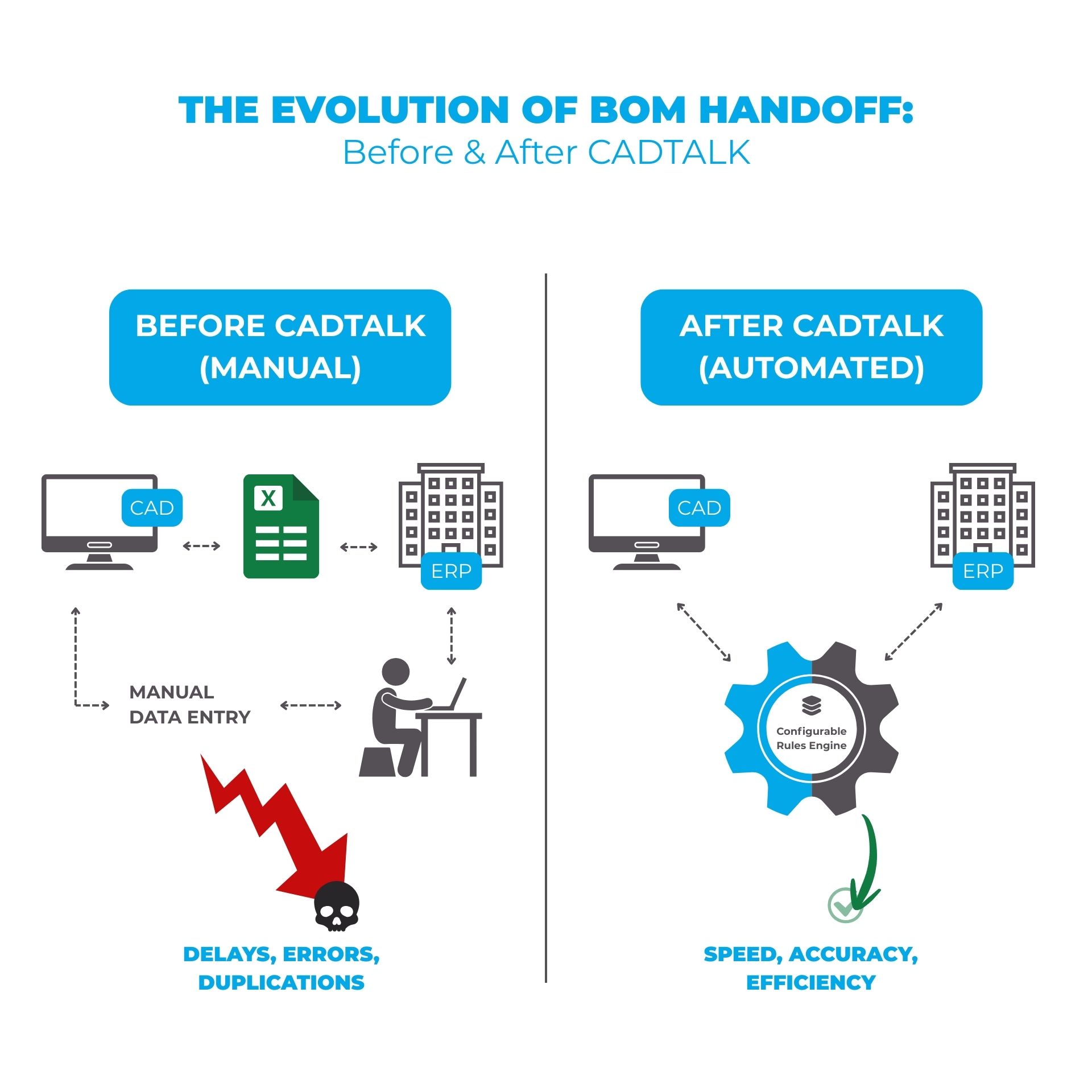
By then you're in crisis mode implementing under pressure. Better to modernize from a position of strength.
For partners: Help clients do the time audit. Real numbers beat abstract "efficiency" claims. Show them the ROI calculator. Make the invisible visible.
14. How do you handle documents and attachments?
A BOM line item says “Bracket, Steel, Qty 4.” The drawing tells manufacturing how to actually make it. Without the drawing attachment, production stops.
What matters: 2D drawings (PDF), 3D models (STEP), assembly instructions, specs, compliance documents.
Integration approaches:
- File path references: Store on network, write path to ERP
- Direct attachment: Integration grabs files, attaches to ERP records
- PLM vault integration: Documents stay in vault, ERP creates links
Most customers want automatic updates during engineering phase, but revision control after release to manufacturing.
For partners: Document integration is often underspecified until late. Ask about it early.
15. How many licenses do we actually need?
The 3:1 rule: For every 3 engineers most manufacturers need 1 floating license. Not every engineer creates BOMs every day: some engineers are doing sustaining work, others are junior staff, some focus on concept development, and others are contractors.
Sizing examples:
- 5 engineers: 2-3 floating licenses
- 25 engineers: 8-10 licenses
- 100 engineers across sites: 30-35 licenses
What affects the ratio: Diverse projects and time zones need fewer licenses per engineer. All new product development in one location simultaneously needs more.
Bonus Tip: Buy for where you'll be in 12 months, not today.
For partners: Help clients analyze usage patterns. Under-licensing frustrates users. Over-licensing wastes budget.
16. Do you have experience with our specific CAD-ERP combination?
This is asking: "Have you done this before, or are we your guinea pig?"
Why experience matters:
System-specific quirks exist. IFS handles revisions differently than Acumatica. Business Central's API differs from F&O. SolidWorks configurations need different logic than Inventor iProperties.
A vendor with deep experience in YOUR combination knows which ERP fields are mandatory, how to handle CAD edge cases, and the best practice BOM structures.
The experience spectrum:
Deep experience (20+ customers): Pre-built templates, faster implementation, documented best practices.
Moderate (5-15 customers): Has done it but less documented. Standard timeline, some trial and error.
Light (1-4 customers): You're helping refine the approach. Longer implementation, more learning curve.
New combination: You're first. Could work if vendor has solid methodology. Or could be an experiment.
Questions to ask:
- How many active customers on our exact combination?
- Can you provide references?
- What's unique about this combination?
- Implementation timeline for this combo?
With CADTALK, we have deep experience across major combinations: 70+ IFS Cloud customers globally, strong Microsoft Dynamics 365 Business Central partnerships, growing NetSuite and Acumatica implementations, and extensive SolidWorks-to-ERP deployments. We can show you references for your specific stack.
For partners: Seek integration vendors who specialize in YOUR ERP platform.
17. Can we do a proof of concept before committing?
Absolutely. But understand what makes a POC valuable versus just extending the sales cycle.
POC approaches:
Data-based POC (2-4 weeks): Vendor receives your sample CAD files, configures in their environment, processes files, shows results. Fast and low-risk. Good for technical validation and comparing vendors.
Pilot implementation (4-8 weeks): Limited scope in your test environment. Small engineer team uses it on real projects. Real-world test with user feedback. Good for final validation and building champions.
What makes POCs succeed:
- Clear success criteria upfront ("Process 10 BOMs with <2% error rate")
- Representative test data including edge cases
- Right stakeholders involved (daily users, ERP admin, budget owner)
- Realistic timelines (don't expect full transformation in 2 weeks)
What makes POCs fail:
- No clear decision criteria = perpetual evaluation
- Wrong data (simple BOMs when reality is complex)
- Key people not engaged
- Scope creep
- No timeline commitment
The investment: Some vendors offer free technical POCs for early evaluation. More involved pilots might cost $5K-10K, often credited toward implementation.
For partners: Help clients define POC scope and success criteria. Well-run POCs accelerate decisions. Poorly defined ones kill momentum.
18. What happens when we upgrade CAD or ERP systems?
System upgrades are inevitable. The question is whether your integration survives.
The nightmare: Custom integration breaks after upgrade. Developer who built it is gone. Production halts while you scramble to find someone who can fix it.
Why custom integrations break: API changes, data structure changes, deprecated features. Custom code hard-coded to old API fails.
The platform approach: Good vendors maintain the platform, not you. When systems update:
- Vendor tests against new versions first
- Vendor updates platform for any API changes
- You install platform update
- You upgrade your systems
- Integration keeps working
CADTALK's platform approach means ERP upgrades typically don't break integration. When IFS Cloud releases a new version, CADTALK issues updates that customers can test in sandbox environments before upgrading production: maintaining continuity without custom code rewrites.
What to ask vendors: How do you handle upgrades? What's your testing cycle? Support window for old versions? Do platform updates cost extra?
For partners: This is a major differentiator. Platform approaches shift upgrade burden to vendor, not your client.
LONG-TERM CONSIDERATIONS
19. How does integration handle multi-site and global manufacturing?
If you manufacture in multiple locations (or plan to) integration complexity multiplies. But so does the value.
The multi-site challenge:
Same product, different sites, different requirements. Your Ohio plant uses Supplier A for raw steel. Your Mexico plant uses Supplier B. Your Shanghai facility has different routings entirely. One engineering BOM needs to become three manufacturing BOMs with site-specific data.
How integration handles it:
Site-specific rules: Define transformation logic per manufacturing site. Same CAD assembly, different ERP outputs based on destination. Part 12345 routes to Work Center A in Ohio, Work Center B in Mexico.
Supplier mapping by location: Purchased components map to regional suppliers automatically. No manual lookup of "which supplier do we use for this part at this site?"
Multi-currency and localization: Costs convert to local currency. Descriptions translate where needed. Compliance documents attach based on regional requirements.
Centralized control, distributed execution: Engineering releases once from headquarters. Integration creates site-appropriate BOMs everywhere simultaneously. No re-keying. No site-to-site inconsistency.
CADTALK supports global deployments where one engineering release can trigger site-specific BOMs across multiple manufacturing locations. Rules configure local suppliers, routings, and costs for each facility, automating what would otherwise require manual coordination across time zones.
What to ask vendors:
- How do you handle site-specific supplier assignments?
- Can rules differ by manufacturing location?
- How does multi-currency costing work?
- What's your experience with global deployments across time zones?
For partners: Multi-site is where integration ROI explodes. The pain of manual coordination across locations is massive. If your client has growth plans or M&A on the horizon, position integration as infrastructure for scale.
20. What metrics should we track to measure success?
You've invested in integration. How do you know it's working? And how do you justify continued investment to leadership?
The metrics that matter:
Time metrics (easiest to measure):
- Hours per week spent on BOM entry (before vs. after)
- Time from design release to manufacturing-ready BOM
- Time spent on BOM-related rework and corrections
Quality metrics (most impactful):
- BOM error rate (errors discovered post-release ÷ total BOMs)
- First-pass yield on new product introductions
- Engineering change cycle time
Business metrics (hardest to attribute but most valuable):
- Time-to-market for new products
- Engineering capacity freed for design work
- Reduction in expedited shipping costs due to BOM errors
How to baseline:
Before implementation, track 2 to 4 weeks of engineer time on BOM-related tasks. Document current error rates. Note how long design-to-production handoffs take. This becomes your "before" snapshot.
Realistic expectations by phase:
Month 1-3 (Implementation): Metrics may temporarily worsen as team learns new process. This is normal.
Month 3-6 (Stabilization): Should see 50-70% reduction in manual BOM entry time. Error rates starting to drop.
Month 6-12 (Optimization): Target 80-90% time reduction. Error rates below 2%. Team gaining independence on rule modifications.
Year 2+: Focus shifts from efficiency gains (already captured) to strategic value: faster product launches, successful acquisitions integrated quickly, seamless system upgrades.
The executive dashboard:
For ongoing reporting to leadership, focus on three numbers:
- Hours saved per month (translate to dollars)
- Error rate trend (should decline over time)
- Engineer satisfaction (survey quarterly; are they happier?)
What success actually looks like:
Six months post-implementation, a successful integration means: engineers complain when the system is down (meaning they rely on it), manufacturing stops questioning BOM accuracy (meaning they trust it), and IT handles most rule changes internally (meaning you're not vendor-dependent).
For partners: Help clients establish baselines before implementation. Post-implementation, schedule quarterly reviews to demonstrate value. This protects the investment and positions you for expansion opportunities.
FINAL THOUGHTS
These 20 questions represent thousands of conversations with manufacturers and partners who've walked this path before you. The technology part is usually straightforward. The hard part is people and process (getting engineers to embrace change, cleaning up data quality issues, making decisions you've been avoiding).
Integration forces those conversations. That's uncomfortable. It's also valuable.
If you're a manufacturer: Start with the business case, not the technology. Why does this matter? What does success look like? Get those answers clear first.
If you're a partner: Your value is as much strategic advisor as technical expert. Help clients see around corners. Share what you've learned from other implementations.
Ready to Talk About Your Specific Situation?
At CADTALK, we've been doing this since 2006 across hundreds of implementations on six continents. We've helped manufacturers eliminate manual BOM entry, reduce errors by 95%, and give engineers back 33% of their time to focus on actual design work.
Our smart configuration engine approach means you're not locked into custom development; you gain independence over time to modify your integration as your processes evolve.
Choose your next step:
- See it in action: Try this clickable tour
- For ERP partners: Contact our partnerships team and get your clients one step closer to getting 33% of their engineering time back
- Run the numbers: Use our ROI Calculator to quantify your current manual process costs
SCHEDULE A CADTALK DEMO
Ready to see what CADTALK can do for your business? See it in action!