
The short answer: Pretty much all of them. But that's not really what you're asking, is it?
The real question is whether your specific combination has been done before (and how well). Because "we support SolidWorks" means nothing if you're running SolidWorks to NetSuite and the vendor has only ever done SolidWorks to Acumatica.
This guide breaks down every integration CADTALK offers, organized by system and industry. Whether you're hunting for a SolidWorks to Business Central integration, an Inventor to IFS connector, or a Windchill to NetSuite BOM sync, you'll find the details here.
Category | What We Support |
|---|---|
ERP Systems | 20+ platforms including Business Central, NetSuite, IFS Cloud, Infor, Acumatica |
CAD Systems | All the big ones: SolidWorks, Inventor, Creo, AutoCAD family, Solid Edge, Tekla, EPLAN |
PDM/PLM Systems | SolidWorks PDM, Vault, Windchill, Teamcenter, Arena PLM, Aras, Agile |
What Transfers | Items, BOMs, routings, revisions, document attachments, custom properties, engineering change orders |
10+ million BOMs processed annually. CADTALK has been getting systems talking since 2006 for manufacturers on six continents.
The Core Problem CADTALK Solves
Here's the thing. Engineering BOMs and manufacturing BOMs are not the same thing. Not even close.
Your CAD system shows every screw, washer, and sub-assembly exactly as designed. But your ERP? It needs kits, phantoms, make-vs-buy flags, and routings organized for production. Manually transforming one into the other wastes engineering time and introduces errors that shouldn't happen in the first place.
That's where the smart configuration engine comes in. You define the transformation logic once ("if part type equals 'fastener' and quantity exceeds 100, roll it into a hardware kit") and every BOM transfer applies those rules automatically. No more stare-and-compare. No more re-keying data.
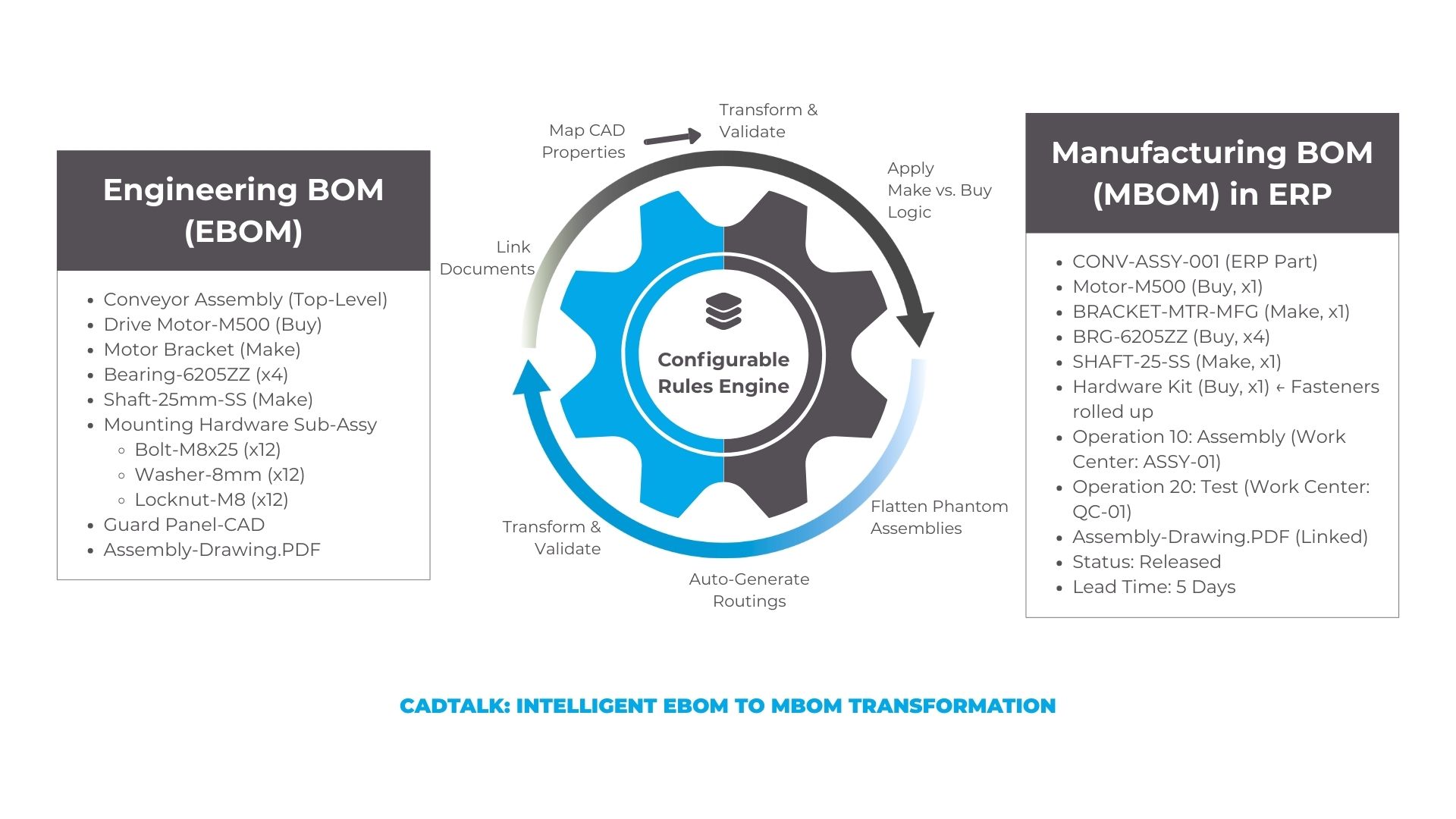
The smart configuration engine transforms an engineering BOM (with individual fasteners, sub-assemblies, and documents) into a manufacturing-ready BOM (with hardware kits, routings, work centers, and make/buy designations).
Core Specialties
CADTALK integrates with a lot of systems. CADTALK has exceptionally deep expertise on five platforms: these are our highest-volume implementations, most refined workflows, and strongest partnerships.
Microsoft Dynamics 365 Business Central
Business Central is one of the fastest-growing mid-market ERP platforms, and CADTALK has built a solid integration supporting both production BOMs and assembly BOMs.
Common CAD pairings with Business Central:
- SolidWorks to Business Central (this is the big one)
- Autodesk Inventor to Business Central
- Autodesk Revit to Business Central (modular construction folks, we see you)
- Creo to Business Central
Who's using it: Packaging manufacturers, pump and fluid systems companies, food processing equipment builders (basically mid-market discrete manufacturers who want their engineers to stop being data entry clerks).
What CADTALK supports: Items, BOMs (production and assembly), routings, revisions, document attachments, custom property mapping.
Oracle NetSuite
NetSuite is the go-to cloud ERP for high-growth manufacturers, and we provide native BOM integration for companies scaling fast.
Common CAD pairings with NetSuite:
- SolidWorks to NetSuite
- Autodesk Inventor to NetSuite
- Creo to NetSuite
- Arena PLM to NetSuite
What CADTALK supports: Items, BOMs, assemblies, routings, revisions, custom field mapping. CADTALK handles NetSuite's multi-subsidiary architecture for manufacturers with multiple business units.
IFS Cloud
This is our flagship. With 70+ IFS Cloud customers worldwide, (more active deployments on IFS than any other ERP platform).
Common CAD pairings with IFS Cloud:
- SolidWorks to IFS Cloud (most popular)
- Creo to IFS Cloud
- Windchill to IFS Cloud
- Siemens Teamcenter to IFS Cloud
- Autodesk Inventor to IFS Cloud
Who's using it: F1 race car manufacturers, billion-dollar defense shipbuilders, blade manufacturers with global operations, industrial machinery companies. If you're running IFS, there's a good chance someone in your industry is already using CADTALK.
What CADTALK supports: Items, BOMs, routings, revisions, document attachments, engineering change orders. CADTALK's integration covers IFS Engineering, IFS Manufacturing, and IFS Project Deliverables modules. Both Apps 10 and IFS Cloud, with full SSO support.
Infor CloudSuite Industrial (CSI)
Infor CSI (you might remember it as Syteline) serves manufacturers in automotive, aerospace, industrial equipment, and high-tech. We support both cloud and on-premise deployments.
Common CAD pairings with Infor:
- SolidWorks to Infor CSI
- Autodesk Inventor to Infor CSI
- Creo to Infor CSI
What CADTALK supports: Items, BOMs, routings, revisions, document attachments, engineering change orders.
Arena PLM
Arena gets a special mention because it's a PLM, not an ERP (but it's become the system of record for a lot of manufacturers, especially in electronics, medical devices, and consumer products).
We're Arena's go-to CAD-to-PLM integration solution.
Common CAD pairings with Arena PLM:
- SolidWorks PDM to Arena PLM
- EPLAN to Arena PLM (electrical)
- Autodesk Inventor to Arena PLM
What CADTALK supports: Items, BOMs, revisions, change orders, document attachments. For companies using Arena as their source of truth, CADTALK makes sure engineering data flows seamlessly from CAD through PLM and into whatever ERP lives downstream.
Complete ERP Integration List
Beyond our core five, we integrate with a whole lot more.
Enterprise ERP Systems
ERP System | Common Use Cases |
|---|---|
Oracle JD Edwards | Process and discrete manufacturing |
Microsoft Dynamics 365 F&SCM | Enterprise-scale manufacturers |
Mid-Market ERP Systems
ERP System | Common Use Cases |
|---|---|
Acumatica | Cloud-first manufacturers |
QAD Enterprise | Automotive and life sciences |
Sage X3 | Process manufacturing |
SYSPRO | Discrete and batch manufacturing |
Priority ERP | Israel/international manufacturers |
MIE Trak Pro | Job shops and make-to-order |
Regional and Specialized ERP Systems
ERP System | Region/Specialty | Common Use Cases |
|---|---|---|
MYOB | Australia/New Zealand | SMB manufacturing |
Senior ERP | Latin America | Brazilian manufacturers |
Haufe X360 | DACH region |
CAD Systems: Full Integration Catalog
CADTALK connects with all the major CAD platforms, each with its own integration approach tailored to how engineers actually work.
SolidWorks Ecosystem
SolidWorks is CADTALK's highest-volume CAD integration. The CADTALK add-in embeds directly in the SolidWorks ribbon, so engineers can push BOMs to ERP without leaving their design environment.
- SolidWorks (3D mechanical): Industrial equipment, consumer products, machinery
- SolidWorks Electrical: Control panels, wiring systems, electrical enclosures
- SolidWorks PDM: Integrated vault-to-ERP workflows with revision control
Typical manufacturers: General industrial equipment, custom machinery, consumer products, automotive components, medical devices.
Autodesk Portfolio
Autodesk Inventor is popular among machinery and industrial equipment manufacturers. CADTALK integrates as an add-in within Inventor.
- Autodesk Inventor: Machinery, industrial equipment, tooling
- Autodesk Fusion 360: Startups, product development, rapid prototyping
- Autodesk Revit: Modular construction, prefabricated buildings, MEP systems
- AutoCAD: 2D drawings and legacy systems
- AutoCAD Mechanical: Mechanical systems with 2D documentation
- AutoCAD Electrical: Electrical schematics and panel layouts
- AutoCAD Architecture: Prefabricated construction components
- Autodesk Vault: Data management with full revision tracking
Typical manufacturers: Industrial automation, modular home builders, commercial construction, machinery OEMs.
PTC Portfolio
Creo (formerly Pro/ENGINEER) serves aerospace, defense, automotive, and other industries with complex parametric modeling needs.
- Creo: CAD for complex assemblies, advanced surfacing, aerospace structures
- Windchill: Enterprise PLM with full BOM synchronization
Typical manufacturers: Aerospace and defense contractors, automotive OEMs, complex machinery manufacturers running engineered-to-order and configured-to-order operations.
CADTALK connects to Windchill via a standalone application that pulls data directly from the Windchill server (no CAD client required for BOM transfers).
Siemens Portfolio
- Siemens Solid Edge: Mainstream 3D design with strong sheet metal capabilities
- Siemens Teamcenter: Enterprise PLM for large-scale manufacturing
Typical manufacturers: Large enterprises with 100+ engineers, automotive suppliers, aerospace tier suppliers. At that scale, automating BOM transfer saves hundreds of thousands of dollars annually in engineering time.
Specialty CAD Systems
CAD System | Primary Use Case | Typical Industries |
|---|---|---|
Tekla | Structural steel, precast concrete | Construction, infrastructure, bridges |
EPLAN | Electrical engineering, control systems | Automation, process control, machinery |
Altium | PCB design, electronics | Electronics, IoT devices, embedded systems |
Acorn Pipe | Piping and plant design | Process industries, oil & gas |
DraftSight | 2D CAD (AutoCAD alternative) | General manufacturing |
Running multiple CAD systems? Happens more than you'd think. A road construction company using Tekla for structural design and Inventor for mechanical components can push BOMs from both systems through CADTALK, each with its own transformation rules, but unified in the smart configuration engine.
PDM and PLM Systems
PDM and PLM systems often serve as the "source of truth" for engineering data. CADTALK integrates with them in two ways:
- Direct CAD-to-ERP (bypassing PDM for BOM transfer)
- PLM-as-Master (PLM is the source, we sync to ERP)
Supported PDM/PLM Systems
- SolidWorks PDM
- Autodesk Vault
- PTC Windchill
- Siemens Teamcenter
- Arena PLM
- Aras Innovator
- Oracle Agile
- Selerant
PLM-as-Master Workflows
Here's a common scenario: you maintain engineering BOMs in your PLM and want manufacturing BOMs in your ERP. But the two structures are completely different. Engineering shows every screw and washer; manufacturing needs kits, phantoms, and routings.
This EBOM-to-MBOM transformation is exactly what CADTALK's smart configuration engine handles. Define the logic once, and every BOM transfer applies it automatically: converting the engineering BOM into a manufacturing-ready structure while maintaining full revision traceability between systems.
Example: An agricultural equipment manufacturer uses Windchill as their engineering master and IFS as their manufacturing system. CADTALK transforms their engineering BOMs into production-ready structures automatically.
Integration Combinations by Industry
Different industries tend toward specific CAD-ERP combinations. Here's what CADTALK sees most often.
Industrial Machinery & Equipment
Common Stack: SolidWorks → CADTALK → IFS Cloud or Business Central
Custom machinery, often engineered-to-order. These manufacturers need robust revision control and the ability to handle both standard products and one-off configurations.
Aerospace & Defense
Common Stack: Creo + Windchill → CADTALK → IFS
Full PLM governance with strict revision control, document attachments, and change management workflows. No shortcuts here.
Automotive & Motorsports
Common Stack: Multiple CAD systems → CADTALK → IFS Cloud
Automotive manufacturers often have multiple CAD platforms across different engineering groups and need a unified path to ERP.
Electronics & High-Tech
Common Stack: Altium + Arena PLM → CADTALK → NetSuite
Specialized PCB design tools with tight PLM integration for revision control and compliance documentation.
Food Processing Equipment
Common Stack: SolidWorks → CADTALK → Business Central or Infor
Sanitary design requirements and FDA regulations make BOMs particularly detailed. CADTALK handles material specifications and finish requirements as custom properties.
Modular Construction & Prefab
Common Stack: Autodesk Revit → CADTALK → Business Central
Modular construction brings manufacturing practices to building. Design in Revit, get production BOMs in ERP.
Packaging
Common Stack: SolidWorks → CADTALK → Business Central
High part counts and frequent design revisions. Automation eliminates the bottleneck between design release and production scheduling.
Pumps & Fluid Systems
Common Stack: SolidWorks or Inventor → CADTALK → Business Central or IFS
Configured products with multiple options require rules-based BOM transformation.
Questions to Ask Your Vendor
Here's how to verify that CADTALK supports your systems.
1. How many active customers use this exact CAD-ERP combination?
Experience matters. A vendor with 70+ customers on a specific ERP has seen edge cases you haven't imagined yet.
Experience Level | what it means |
|---|---|
20+ customers | Pre-built templates, documented best practices, fastest implementation |
5-15 customers | Solid experience, standard timeline |
1-4 customers | You're helping refine the approach |
New combination | You're first! Not a bad thing, but expect longer timelines |
2. Can you demo with CADTALK's specific systems?
Generic demos are easy. Demonstrations using your CAD system, your ERP environment, and your sample data? That reveals real capability.
3. How do you handle version upgrades?
Your CAD and ERP vendors release updates. Will the integration break? CADTALK keeps compatibility tight, usually within 1-2 months of major releases. This comes up constantly as a deciding factor when customers evaluate integration solutions.
4. What's unique about this combination?
Every ERP handles revisions differently. Business Central's API differs from IFS Cloud's. SolidWorks configurations require different logic than Inventor iProperties. Vendors with deep experience know these nuances.
Frequently Asked Questions
Can CADTALK handle multiple CAD systems in one environment?
Yes. Plenty of manufacturers run SolidWorks, Inventor, and Creo simultaneously across different engineering groups. CADTALK provides separate connectors for each CAD system, but they all feed into the same smart configuration engine and ERP connector. One set of transformation rules.
What about CAD systems not on your list?
If it can export to a standard format (CSV, XML, or SQL), CADTALK can typically work with it. CADTALK has integrated specialty systems like Ship Constructor (for shipbuilding) by partnering with the CAD vendor to establish a data pathway.
Do you integrate with cloud-hosted ERP systems?
Yep. Microsoft Dynamics 365 Business Central, IFS Cloud, Oracle NetSuite, and Acumatica are all cloud-native systems CADTALK integrates with via secure API connections.
How do I know if my PDM should be involved in the integration?
If your PDM/PLM is your "single source of truth" for engineering data (meaning released revisions live there) then yes, CADTALK should pull from PDM/PLM. If engineers release directly from CAD and your PDM is primarily file storage, direct CAD-to-ERP integration may be simpler.
What if we're migrating ERP systems?
Good news: CADTALK's smart configuration engine is ERP-agnostic on the transformation side. If you're moving from QAD to Business Central, your CAD workflow and most transformation rules stay the same: only the ERP connector changes.
How secure are these integrations?
All integrations use secure API connections to your CAD, PDM/PLM, and ERP systems. CADTALK supports role-based access control, single sign-on (SSO), and provide full audit trails for compliance requirements. No data is stored in transit; CADTALK transforms and passes data directly between your systems.
Next Steps
The fastest way to validate your specific combination? See it live with your actual systems and sample data.
→ Request a Demo — See CADTALK with your CAD-ERP combination
→ Calculate Your ROI — Quantify time savings for your engineering team
→ Explore Partnership — For ERP resellers and systems integrators
CADTALK has been automating CAD-to-ERP integration since 2006. CADTALK's smart configuration engine transforms engineering data into manufacturing-ready formats (without custom development, without vendor lock-in, and without breaking when your systems update).
Most modern integrations connect via APIs that already exist in your CAD and ERP systems. No custom coding into your source systems. No data stored in between. Just intelligent transformation from point A to point B.
SCHEDULE A CADTALK DEMO
Ready to see what CADTALK can do for your business? See it in action!